ChatGPT gets a lot better when you feed it something substantial, and a full YouTube video transcript is one of the most useful things you can paste in.
With YouTube Text Tools, you can copy any video’s transcript in one click, then paste it into ChatGPT for analysis, summarization, translation, or any custom task you can think of.
Here are 10 prompts worth trying.
How to Copy a Transcript
Before diving into prompts, here’s the quick workflow:
- Open any YouTube video with YouTube Text Tools installed
- Click the copy icon in the extension toolbar (the clipboard icon next to the view selector)
- Open ChatGPT and paste the transcript with your prompt
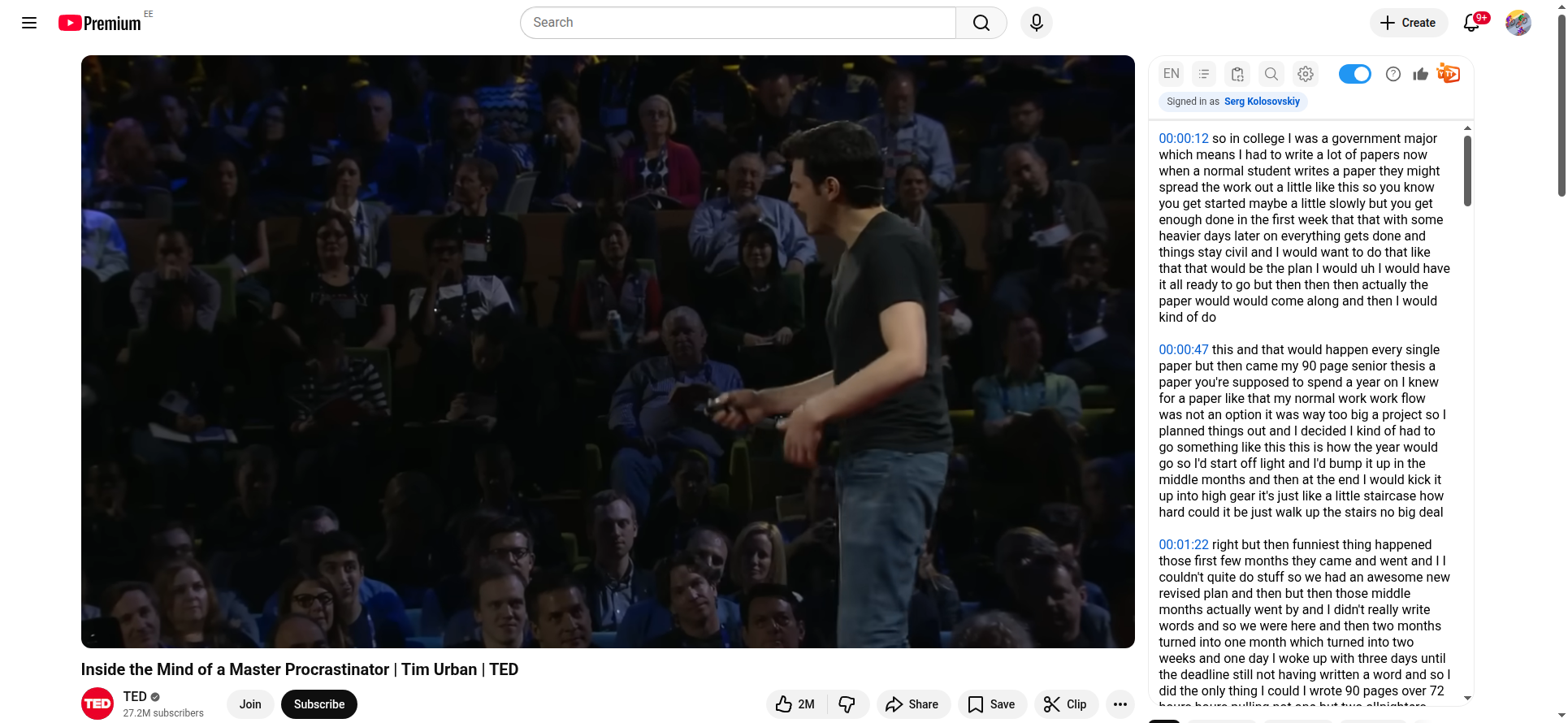
The copied transcript includes timestamps, so ChatGPT can reference specific moments in the video.
1. Quick Summary
This is the simplest prompt on the list, and probably the one you’ll use most. Get the key points without sitting through the full video.
Summarize this video transcript in 5 bullet points. Focus on the main arguments and conclusions:
[paste transcript]
Best for: Deciding whether to watch a video, getting a quick overview, sharing key points with others.
2. Detailed Study Notes
Any lecture or educational video can become organized study material in seconds.
Create detailed study notes from this lecture transcript. Organize by topic with headings, subheadings, and bullet points. Include key terms and definitions:
[paste transcript]
Students reviewing lectures get the most out of this one, but it’s just as handy for professionals picking up new skills or anyone building a personal knowledge base.
3. Flashcards
This prompt generates flashcards you can drop straight into a spaced repetition app.
Create 15 flashcards from this transcript. Format each as: Q: [question] A: [answer] Cover the most important concepts, terms, and facts:
[paste transcript]
Works well for: Exam prep, memorizing key concepts, building vocabulary from language-learning videos.
4. Fact-Check
Not sure about the claims in a video? Have ChatGPT pull them apart.
Review this transcript and identify all factual claims. For each claim, rate your confidence that it’s accurate (high/medium/low) and explain why. Flag any claims that seem misleading or need additional context:
[paste transcript]
Useful for news analysis, evaluating educational content, or just sharpening your critical thinking.
5. Blog Post Draft
Turn a video into a written article. Great for content repurposing.
Rewrite this video transcript as a well-structured blog post. Use clear headings, short paragraphs, and a conversational tone. Remove filler words and repetition while preserving all key information:
[paste transcript]
Best for: Content creators, bloggers, and marketers who want to repurpose video into written form.
6. Translation With Context
ChatGPT understands context, so its translations tend to read more naturally than what you’d get from a straight machine translation tool.
Translate this transcript to [language]. Preserve the speaker’s tone and style. Where idioms or cultural references appear, adapt them naturally rather than translating literally:
[paste transcript]
Works well for: Understanding foreign-language content, creating subtitles, sharing videos across language barriers.
7. Meeting Action Items
If you record meetings or presentations, this prompt pulls out the stuff that actually matters.
Extract all action items, decisions, and deadlines from this meeting transcript. Format as a checklist organized by person responsible (if mentioned). Separately list any open questions that weren’t resolved:
[paste transcript]
Project managers and team leads will get the most mileage here, though it’s useful for anyone who records meetings and doesn’t want to re-watch them.
8. Twitter/X Thread
Turn a long video into a shareable social media thread.
Turn this transcript into a Twitter/X thread of 8-10 tweets. Start with a hook that grabs attention. Each tweet should be self-contained but flow naturally into the next. End with a takeaway. Keep each tweet under 280 characters:
[paste transcript]
Best for: Social media managers, thought leaders, anyone sharing video insights online.
9. Debate Prep
Want to understand both sides of an argument? This prompt breaks down what the speaker said — and what they didn’t.
Analyze the arguments in this transcript. List the main claims, the evidence provided for each, and potential counterarguments the speaker didn’t address. Rate the overall strength of the argument:
[paste transcript]
Handy for debate preparation, critical analysis, or just getting a fuller picture of a complex topic.
10. Compare Two Videos
Paste two transcripts to find where they agree, where they diverge, and what each one brings to the table.
I’m pasting two video transcripts below. Compare their main arguments, where they agree, where they disagree, and what unique insights each one offers.
Transcript 1: [paste first transcript]
Transcript 2: [paste second transcript]
Best for: Research, getting a balanced view on controversial topics, comparing different approaches to the same subject.
Tips for Better Results
- Include timestamps. YouTube Text Tools copies timestamps by default. This lets ChatGPT reference specific moments (e.g., “at 5:23, the speaker mentions…”)
- Be specific. Instead of “summarize this,” tell ChatGPT exactly what format you want and what to focus on
- Iterate. After the first response, ask follow-up questions like “expand on point 3” or “make the flashcards harder”
- Combine prompts. Nothing stops you from asking for a summary AND flashcards AND a quiz in the same conversation
- Use long videos. ChatGPT handles full-length lectures and podcasts well. The longer the transcript, the more value you get from AI analysis